Automatic time tracking.
Always compliant.

Clockr automatically records your employees' working hours, with no extra administration.

Automatic
No manual input
100% Compliant
Meets labour law requirements
5 years
Statutory retention period
app.clockr.be/dashboard
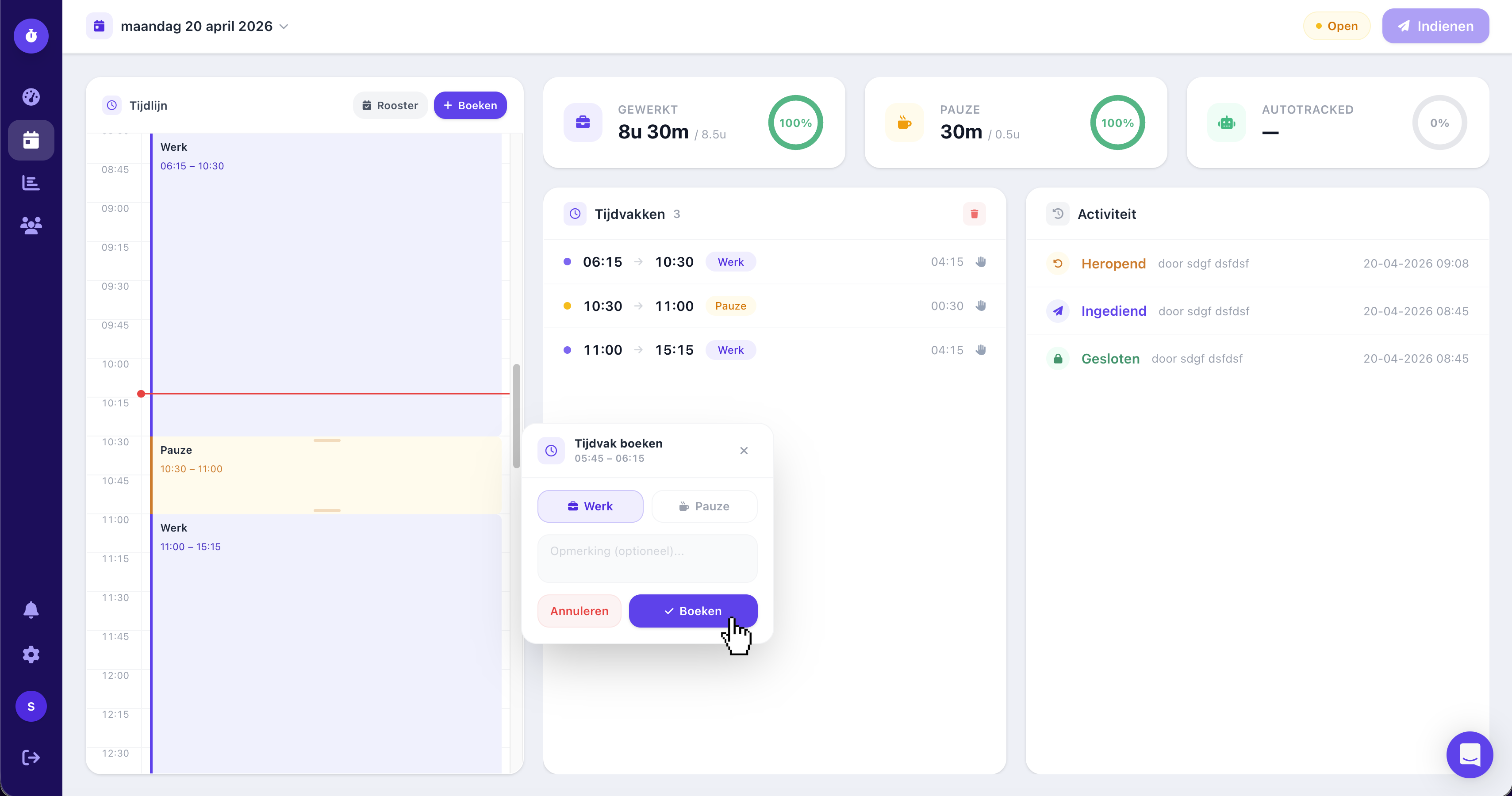
Clockr dashboard

Working hours

Tracked automatically

100% Compliant

Labour law

Reminder sent

3 employees
Features

Everything you need

Clockr is purpose-built for efficient time tracking, without creating any administrative burden.

Automatic recording

Working hours are detected automatically via the Clockr app, with no manual input required.

Learn more

Privacy guaranteed

Employees decide what gets submitted. Clockr is not a monitoring tool — it is a time registration aid.

Learn more

Automatic reminders

Hours not submitted on time? Clockr automatically reminds employees, so you never have to chase them.

Learn more

Absence

Absences are detected automatically and can easily be categorised as personal or work-related.

Learn more

Export & retention

Export records for payroll or inspection. All data is retained for a minimum of 5 years in line with statutory requirements.

Schedule deviations

Clockr automatically flags when hours worked do not match the planned schedule.

Learn more

Calendar integration

Sync with Google Calendar or Microsoft 365 for automatic linking of appointments and working time.

GPS geofencing

Employees can only clock in and out when they are physically within a zone you have defined, such as a branch or work site. Clockr automatically verifies their location with every registration.

Kiosk

Let employees clock in via a shared tablet on the shop floor. Simple, fast, and no personal device needed.

Two methods

You choose how your team registers

Clockr supports two methods of time registration. You decide which method suits your team, department, or working environment.

01

Employees register

Book, review, and submit time periods via the portal or mobile app. Clockr sends automatic reminders if hours are forgotten.

02

Managers review

When needed, managers review submitted hours. Deviations from the schedule are flagged automatically.

03

Data always available

Managers and accountants have direct access to all data. Export for payroll or inspection with a single click.

Method 1

Free time entry

Employees enter their own time periods via the portal or mobile app. Flexible and ideal for office or remote workers.

  • Enter start and end times yourself
  • Adjustments and corrections are always possible
  • Submit for approval with a single tap

Geschikt voor

Office remote hybrid teams

Method 2

Clock in & out

Employees clock in and out via the app, the portal, or the kiosk tablet. Clockr automatically records the start and end of each working day.

  • Clock in via app, portal, or kiosk
  • Breaks are registered separately
  • Clocking out closes the working day automatically

Geschikt voor

Manufacturing retail hospitality kiosk

Both methods can be used side by side within the same organisation.

See how Clockr works

Short introduction, approx. 3 minutes

Mobile

Always to hand.
Works anywhere.

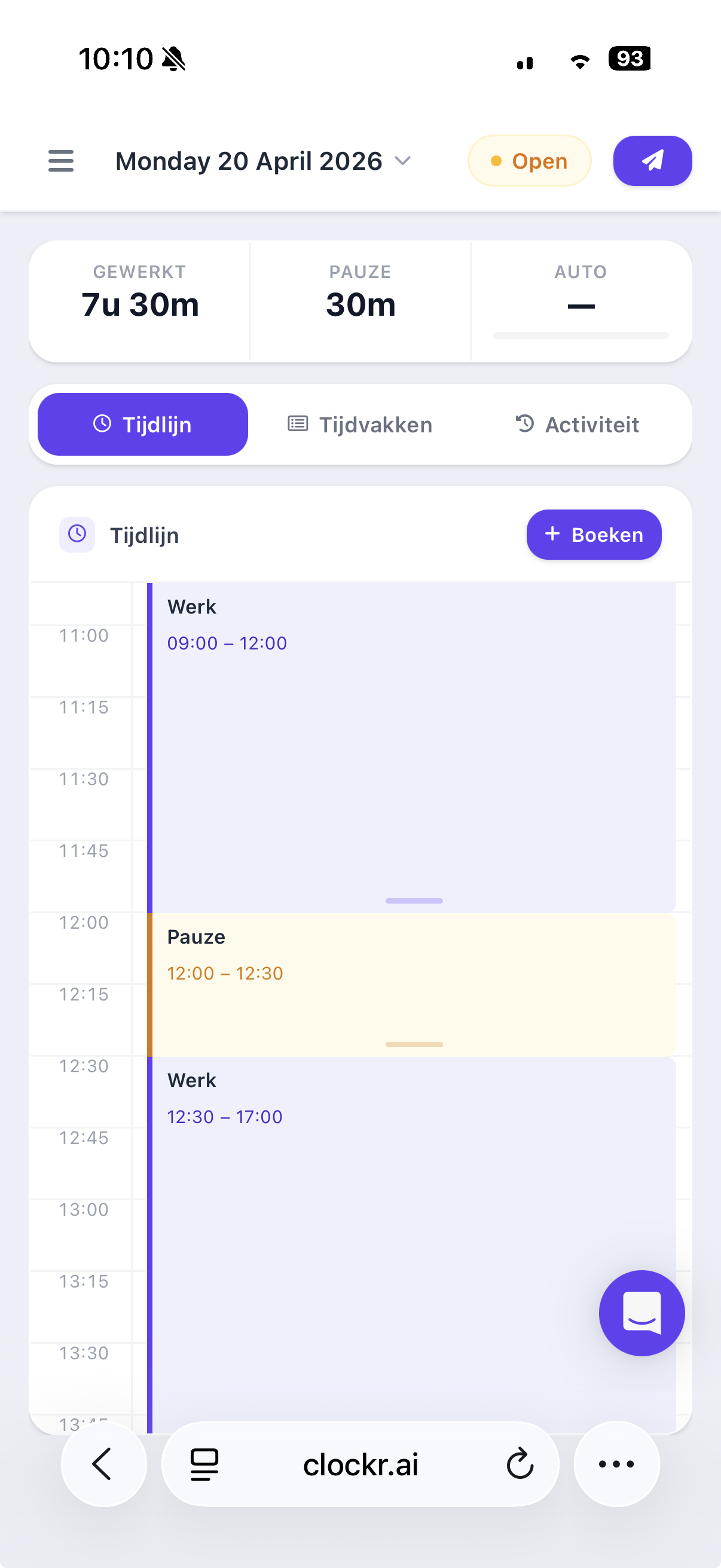
Clockr is designed from the ground up for mobile use. Employees can view their timeline, book and adjust time periods, directly from their smartphone.

At home, in the office, or on the go

Whether your employees work from home, on site, or commute: Clockr works everywhere.

At their convenience

Submit hours between meetings, after work, or from the sofa. No time pressure.

Simple for employees

No manual needed. View, adjust, and submit time periods in a few taps.

iPhone & Android

Fully optimised for mobile use, seamlessly on every screen.

Optional GPS geofencing

Restrict clock-ins to approved locations. Clockr automatically checks whether employees are within the correct perimeter.

Try for free
Clockr op mobiel

09:00 – 17:30

Time period logged

Day submitted

Pending approval

Kiosk

Clock in on location.
Via shared tablet.

Not everyone has a smartphone to hand. With the Clockr Kiosk, employees clock in and out via a fixed tablet on the shop floor — fast, simple, and no personal device required.

Shared tablet on the shop floor

Mount a tablet at the entrance or workstation. Employees clock in within seconds using a personal PIN.

Ideal for production environments

In production environments where smartphones are not permitted, the kiosk provides the solution. Employees clock in via a fixed tablet without needing their own device.

Optional photo capture

Capture a photo with each clock action for additional verification. Fully optional and configurable per client.

09:41

clockr

Voer uw pincode in

6-cijferige code

1
2
3
4
5
6
7
8
9
0

Ingeklokt

08:02 · via kiosk

Geen smartphone

nodig

"Clockr saves us hours of administration every week. Finally a system that works automatically."

M

Marie Declercq

HR Manager · Antwerp

"Thanks to Clockr we are fully prepared for a social inspection. All data is neatly recorded."

J

Jan Pieters

Managing Director · Ghent

"Our employees do not need to do anything. Clockr records everything in the background."

S

Sophie Van den Berg

Operations Director · Brussels

Privacy & Security

Built on trust

Your company data and that of your employees are in safe hands. Clockr is ISO 27001-certified, stores all data in the EU, and guarantees the privacy of your employees.

ISO 27001

Independently certified security.

EU data storage

Servers exclusively in the Netherlands and Belgium.

Employee privacy

Employees control their own hours.

GDPR-compliant

Fully aligned with European privacy law.

More about privacy & security

Security status

Current overview

ISO 27001 Certified
GDPR Compliant
EU data storage Active
Encryption AES-256 / TLS 1.3
Uptime SLA 99.9%
Retention period 5 years
Where things go wrong

Your employees forget.
Clockr reminds them.

Most non-compliant companies use a tool without a reminder system. Employees forget to submit hours; by the time an inspection arrives, it is too late.

Excel & spreadsheets

No spreadsheet sends automatic reminders. The responsibility falls entirely on the employee.

Clockr reminds automatically

Hours not submitted? Clockr automatically sends reminders at the right moment, without you having to check.

Managers see it instantly

The admin dashboard shows at a glance which employees are overdue, so you can always step in on time.

Outstanding hours

3 employees overdue

Action required
JD

Jan De Smedt

5 days overdue

Reminded
SV

Sara Vermeersch

2 days overdue

Reminded
PW

Pieter Wouters

1 day overdue

Later

Reminders are sent automatically. You do not need to do anything.

Tom van Eijmeren
Free webinar · Every Thursday at 13:00

Time tracking in practice: how do you get started?

In 45 minutes, Tom van Eijmeren shows you how to set up time tracking efficiently, from attendance to reporting, without any extra administration.

Register for free

Every Thursday · 13:00 · 45 min

Get started today · No long-term commitment

Up and running in 3 minutes.

Start today. No technical knowledge required — fully operational in less than a day.